




Enterprise AI is no longer about chatbots answering FAQs. With SAP Joule Studio, you can build intelligent agents that plan, reason, and execute complex multi-step business workflows — with no PhD required. This guide walks you through everything you need to get started.
What is SAP Joule Studio?
SAP Joule Studio is SAP's AI-first development environment, built inside SAP Build, for creating custom AI agents, skills, apps, and workflows. It sits on top of the SAP Business AI Platform and gives developers — from low-code beginners to pro-code engineers — a unified workspace to go from idea to production-grade AI.
Think of it as the "IDE for enterprise AI": instead of writing code to automate tasks manually, you describe your agent's goal in plain language, wire up tools and data sources, and let the agent figure out how to execute the plan.
The Agent Builder in Joule Studio reached General Availability in December 2025 (Skill Builder became GA in July 2025). It is now production-ready and actively used by companies like Nestlé, KPMG, Accenture, and Florida Crystals.
Joule Agents vs. Joule Skills — What's the Difference?
Before you build, you need to know which tool fits the job. Joule Studio offers two complementary building blocks:
| Feature | Joule Skills | Joule Agents |
|---|---|---|
| Best for | Rule-based, repetitive tasks | Complex, multi-step reasoning tasks |
| Execution style | Predefined, deterministic flow | Dynamic planning & adaptive execution |
| Decision making | Follows fixed pathways | Plans, adjusts, and iterates autonomously |
| Example | Create a badge for an employee ID | Check if a maintenance order can proceed based on stock |
| Ideal scenario | Consistency and reliability needed | Dynamic workflows with unknown paths |
Key Components of a Joule Agent
Every Joule Agent is made of four core modules working together:
Goals & Instructions Module
Defines the agent's purpose using plain-language instructions. The clearer your goal, the better the agent performs.
Planning & Reasoning Engine
Powered by an LLM of your choice. Breaks complex tasks into sub-goals and determines the optimal sequence of actions.
Tools
Joule skills, APIs, calculators, and external connectors the agent calls to interact with real systems and data.
Memory Module
Stores outcomes and learnings across interactions so the agent improves its decision-making over time.
Building Your First Joule Agent — Step by Step
Here is the core workflow for creating an agent in Joule Studio, using a maintenance planning scenario as an example (a planner needs to check if materials are available before starting a work order).
Set Up Your Environment
Navigate to the SAP Build Lobby and activate a private environment from Control Tower → Environments. Private environments give you an isolated sandbox to build and test without affecting live systems. Ensure you have the Joule foundation plan and SAP Build Process Automation entitlements on your BTP subaccount.
Create a Joule Agent Project
In the SAP Build Lobby, choose Create → Joule Agent. Give your agent a descriptive name and a clear business-oriented description — Joule uses this description at runtime to match user intents to the right agent. Poor descriptions lead to wrong agent activations.
Define Goals and Instructions
In the agent editor, write an expertise summary (what your agent is good at) and a set of instructions (how it should behave step by step). For example: "Validates maintenance orders, checks material stock, and recommends actions to ensure fulfillment." You can ask Joule itself to help draft these, trained on SAP best practices.
Select an LLM and Configure MCP
Choose a Large Language Model to power the agent's reasoning — Joule Studio offers several options. Then configure a Model Context Protocol (MCP) server to connect the agent to external tools, APIs, and SAP or non-SAP data sources.
Inject Tools and Actions
Link your agent to relevant Action Projects (API-backed connectors) and pre-built Joule skills. For our maintenance scenario, we connect to a CAP-based backend service exposed via an SAP BTP destination that returns stock levels for a given material ID.
Test in the Live Simulator
Use Joule Studio's built-in live simulator inside your private environment to test your agent with real queries. Ask it to validate a maintenance order ID, watch it retrieve stock data, and observe how it recommends the next action — all without touching production.
Deploy to Managed Runtime
Once tested, deploy your agent directly from Joule Studio to SAP's fully managed runtime — no infrastructure to manage. The runtime is built to scale and integrates seamlessly with the rest of SAP's agent ecosystem, including governance, identity controls, and monitoring.
What Can You Build?
Joule agents are already running in production at major enterprises. Here are some proven use cases across business functions:
Order Fulfillment Automation
Agents that pull data from SAP and non-SAP sources to automate complex order fulfillment processes end-to-end.
Material Stock Validation
Agents that check if required materials for work orders are in stock, replacing days of manual data hunting.
Shipment Optimization
Agents that adjust delivery plans dynamically based on real-time conditions like weather or delays.
Talent Acquisition
Agents that manage multi-step hiring workflows and surface the right candidate actions at the right time.
Negotiation Support
Agents that research supplier data, generate negotiation strategies, and route approvals automatically.
Audit & Reporting
Agents that cross-check financial data across systems and flag discrepancies without manual intervention.
Governance, Security & Trust
One concern with agentic AI is: "How do I know the agent is doing the right thing?" Joule Studio is designed with enterprise controls at its core:
- Identity & Access Controls — integrated with SAP Cloud Identity Services
- Human-in-the-Loop — enforce human approval checkpoints for critical decisions
- Pre-launch Validation — test and validate agents before deployment
- Continuous Monitoring — visibility into agent behavior, decisions, and failures in production
- Data Protection Guardrails — built-in policies from the same framework that powers ready-to-use Joule agents
This makes Joule Studio suitable not just for pilots, but for mission-critical workflows at scale.
The Joule Studio Roadmap
SAP is investing heavily in expanding Joule Studio's capabilities throughout 2026. Here's what's coming:
Agents that activate automatically based on system events, API calls, or scheduled triggers — no manual user input needed.
Multiple specialized agents that coordinate and share context for complex cross-functional processes.
Ability to extend SAP's ready-to-use Joule agents with custom logic and tools in an upgrade-safe way.
Connect agents across SAP and non-SAP landscapes using open protocols.
How to Register
Follow these steps to register and enroll for the SAP Joule Studio session:
Login to the Portal
Go through the link and click on "Login" and enter your login details.
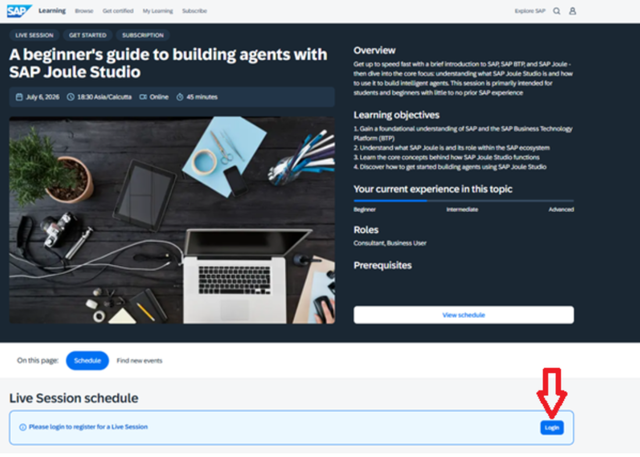
Login screen — enter your registered credentials
Create a New Account (if not registered)
If you haven't created an account, click on "Register". Then provide basic information:
- First Name, Last Name, and Email ID
- Set your password
- Check your email to verify your email address

Registration form — fill in your basic details and verify your email
Enroll for the Session
After successful login, click on "Register" to enroll for this session.

Click "Register" to confirm your session enrollment
Confirmation & Email
You have now registered successfully and will receive a confirmation email.

Registration confirmation — check the on-screen message

Confirmation email — check your inbox for the booking details
Hosted on SAP Learning · Free · Online
Ready to Build Your First AI Agent?
Explore SAP Joule Studio inside SAP Build and start creating intelligent agents that transform how your enterprise works.

Mr. Ansar Ali is a globally certified SAP trainer with expertise in ABAP development, SAP Business AI, and SAP implementation. He has trained numerous professionals in SAP technologies.